UAD 3.6 Explained: What Every Residential Appraiser Needs to Know
The Biggest Residential Reporting Change Since the 1004
On November 2, 2026, every new residential appraisal submitted to Fannie Mae or Freddie Mac has to be in UAD 3.6 format. The legacy 1004, 1073, 2055, 1004C, and a dozen other forms residential appraisers have been completing for years all stop being accepted for new submissions on the same day. UAD 2.6 revisions on previously submitted reports remain allowed through May 3, 2027, but no new assignment can come in on the old standard after the cutover.
This is a fundamental change in how appraisal data is captured, structured, and delivered, and the GSEs have been telegraphing it since 2018. As of December 2025, the Limited Production period is underway, software vendor verifications are rolling in (Cotality TOTAL completed verification on December 16), and the broad production period that opens UAD 3.6 to all lenders begins January 26, 2026.
Here’s what working appraisers need to know now.
What UAD 3.6 Actually Is
UAD 3.6 is the new Uniform Appraisal Dataset standard from Fannie Mae and Freddie Mac, built on MISMO 3.6. Two changes matter most:
One dynamic URAR replaces a dozen static forms. Instead of selecting a 1004 or 1073 or 2055 at the start of an assignment, you enter property characteristics (dwelling type, inspection type, occupancy) and the report adapts. Site-built, condominium, cooperative, manufactured, and 2-to-4-unit subjects all flow through the same URAR with different sections appearing based on what you enter.
Structured data replaces narrative addenda. Where you used to write free-form commentary (defect descriptions, view characterization, neighborhood analysis), UAD 3.6 captures the same information in standardized fields with discrete options. The MISMO 3.6 XML output is machine-readable end-to-end.
The delivery format also changed. UCDP submissions are now ZIP files containing the XML, a PDF rendering, and a property-images folder. The 60 MB size limit reflects how much more data is moving through the pipe.
The Timeline
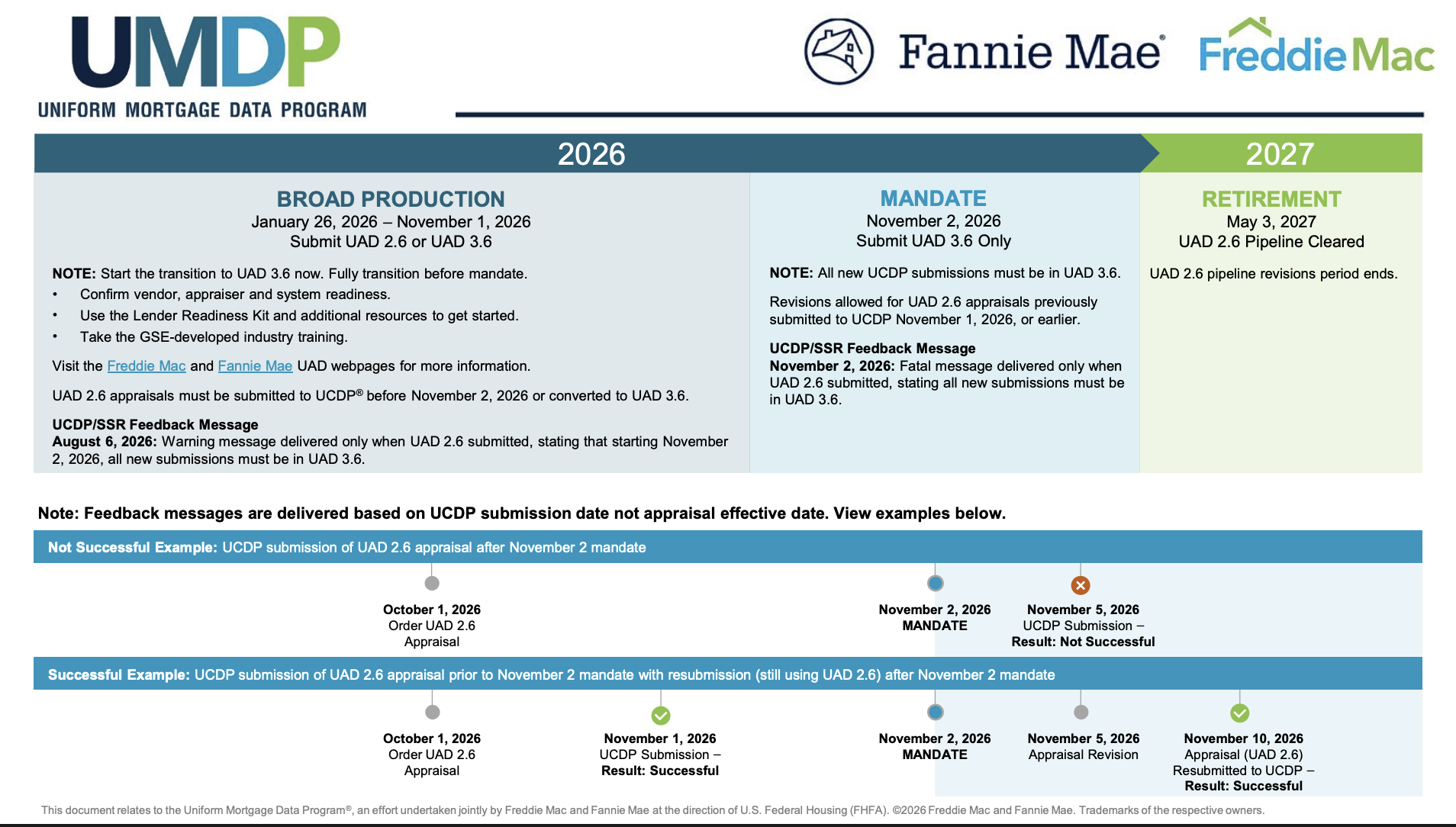
The mandate window matters because lenders who finish their integrations early will start sending UAD 3.6 assignments long before November. If you wait until the mandate to learn the new system, you’ll be learning it on rush jobs.
Twelve Forms to One URAR Form
The legacy forms retiring under UAD 3.6:
- 1004 / 70 — Uniform Residential Appraisal Report
- 1004 Desktop / 70D — Desktop URAR
- 1004 Hybrid / 70H — Hybrid URAR
- 1004C / 70B — Manufactured Home
- 1004D / 442 — Appraisal Update and/or Completion
- 1073 / 465 — Individual Condominium Unit
- 1073 Desktop / 465D — Desktop Condo
- 1073 Hybrid / 465H — Hybrid Condo
- 1075 / 466 — Exterior-Only Condo
- 2055 — Exterior-Only Residential
- 2090 — Cooperative Interest
- 2095 — Exterior-Only Cooperative
- 1025 / 72 — Small Residential Income (2-to-4 unit)
- 1007 / 1000 — Single Family Comparable Rent Schedule
What replaces them is data-driven structure. Enter “condominium” as the dwelling type and condo-relevant sections appear (HOA, project history, common areas) while site sections like lot and septic drop away. Add an ADU and a repeatable data block opens for that structure’s characteristics. The report itself is generated from your inputs rather than from a preselected template.
This is the single biggest mental shift the new standard demands.
What’s Actually Different in the Field
A handful of operational changes ripple into daily work:
- Photos embed in sections. Kitchen photos go in the kitchen subsection, roof photos in the roof subsection. The centralized photo addendum at the end of the report is gone.
- Condition and quality each get three ratings. Interior and exterior receive separate C1-C6 / Q1-Q6 ratings, then reconcile to an overall. The C/Q definitions themselves were rewritten to make adjacent ratings easier to distinguish.
- ADDD is its own section. Apparent defects, damage, and deficiencies move out of narrative addenda into a structured inventory tied to the affected component.
- Comparable drive-by inspection retired. You still need clear front-elevation photos of each comp, but the GSEs no longer require physical street-side inspection. MLS, public-records, and Street View sources are acceptable when explicitly documented.
- Ceiling height required. Approximate height rounded to the nearest foot is now mandatory for all interior spaces.
- Broadband reporting required. Look up the property at broadbandmap.fcc.gov and document availability.
- Highest-and-best-use becomes structured. The four tests (legally permissible, physically possible, financially feasible, maximally productive) are now yes/no fields with explanatory commentary instead of free-form prose.
What to Do Now
If your engagement letter on a current assignment uses a 1004, you have until November 2 to keep delivering the way you always have. But the work to be ready for the mandate starts now:
- Confirm your software vendor’s UAD 3.6 verification status. Check Fannie Mae’s Integrated Vendor List. If your platform isn’t on it yet, ask your vendor for a timeline.
- Take the GSE training. Fannie Mae’s Uniform Residential Appraisal Report training and Freddie Mac’s UAD redesign resources are free.
- Run a dry-run UAD 3.6 assignment on a recent file. As soon as your vendor’s UAD 3.6 build is available in production, repeat a closed assignment in the new format. The first time through is where the friction is.
- Audit your front-end intake. UAD 3.6’s structured fields punish inconsistent data entry, and most of those fields originate at order intake. When you’re ready to test, see how Appraisal Inbox’s UAD 3.6 export carries order data into your report writer in MISMO 3.6 format.
Resources
- Fannie Mae UAD page
- Freddie Mac UAD redesign timeline (PDF)
- Fannie Mae Integrated Vendor List
- MISMO 3.6 Reference Model
- Fannie Mae UAD 3.6 Compliance API factsheet (PDF)
The November 2, 2026 mandate is roughly ten months away as of this writing. Pick a verified vendor, schedule the GSE training, run a dry-run assignment, and you’ll arrive at the cutover with the new workflow already in muscle memory.
Recent Posts
Feature Spotlight: Company Branding
Apply your firm's logo and brand colors to invoice PDFs, client emails, the public Client Form, and ...
Read moreFeature Spotlight: Tags & Priority Flags
Label and triage appraisals with color-coded tags and four-level priority flags, visible on the orde...
Read moreFeature Spotlight: Export Appraisal Orders to UAD 3.6
Export any residential appraisal order from Appraisal Inbox as a UAD 3.6 MISMO XML zip and import it...
Read more