Feature Spotlight: Export Appraisal Orders to UAD 3.6
Still Re-Keying Order Into Your Report Writer?
Until now, every residential report has started the same way. An order lands in Appraisal Inbox via Smart Form, Order Forward, or your Client Form. You assign the team, schedule the inspection, and start researching the subject property. Then you open Appraise-It Pro or TOTAL and start typing the same fields all over again. Over thirty fields that already exist in your order.
What Re-Keying Costs You
- Wasted setup time: Every report starts by retyping data that’s already in your CRM and order management system
- Copy-paste errors: Misspelled addresses, transposed file numbers, wrong county, missed fields
- Slow start: The actual analysis waits while you key in the order
What is the UAD 3.6 Export?
UAD 3.6 is the new Uniform Appraisal Dataset standard from Fannie Mae and Freddie Mac, mandated for all GSE submissions on November 2, 2026. It replaces the legacy form-by-form workflow (1004, 1073, 2055, 1004C) with a single dynamic URAR built on MISMO 3.6 XML.
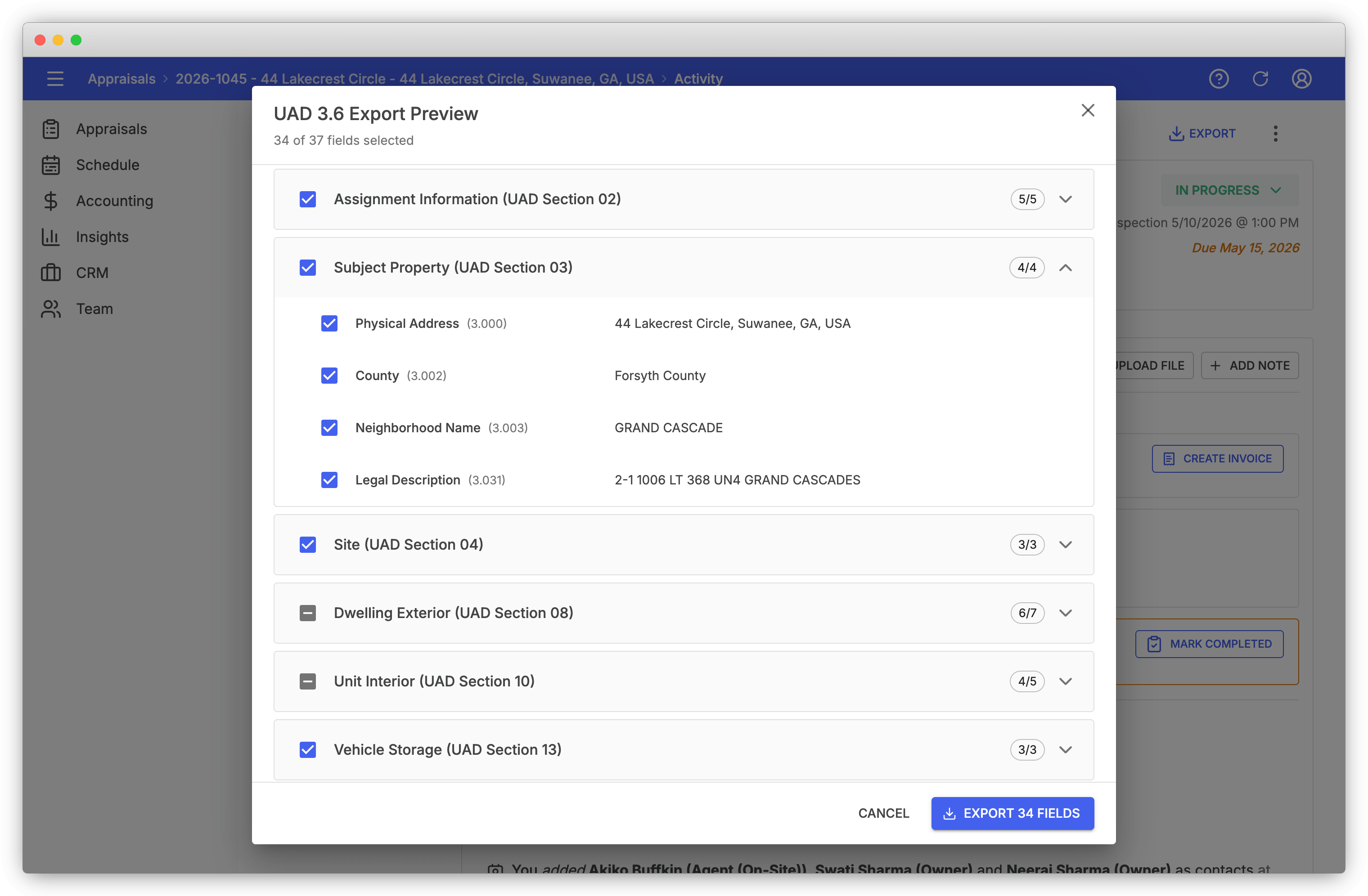
Appraisal Inbox now exports any residential order as a UAD 3.6 zip. Click Export > Export to UAD 3.6 on the order, pick the fields to include, and download a MISMO 3.6 compliant archive. Import it into your report writer and the order is already populated.
Most of those fields are populated for you on intake. When you add a property to Appraisal Inbox via Smart Form, it’s geocoded and enriched from public records, and that enrichment carries through to the UAD 3.6 export. If you migrated from Anow, this carries many more fields than the Anow export did.
Key Benefits of the UAD 3.6 Export
- Skip the re-typing: Over 30 order fields move from Inbox into your report writer in one click
- Industry-standard format: MISMO 3.6 XML packaged as the GSE-required zip, the same shape UCDP expects
- Field-level control: Preview every field before exporting and uncheck anything you want to leave out
- Dwelling-type aware: Export adapts to site-built, condominium, cooperative, manufactured, and multi-unit subjects
How the Export Works
Open a residential order and click Export > Export to UAD 3.6. The dialog previews every field the zip will contain, grouped by UAD section. Fields with values are auto-selected and empty fields stay unchecked, so you don’t carry blanks into your report writer. Toggle individual fields or whole sections, then click Export.
Where You Can Import the Export Today
SFREP Appraise-It Pro supports UAD 3.6 import today. Export from Inbox, open Appraise-It Pro, import the zip, and your subject information, parties, sale history, and parcel data are pre-populated before you place a single comp.
Cotality (formerly a la mode) TOTAL is rolling out UAD 3.6 support, with import capability coming as part of that release. As Cotality and other major report writers (ACI, Bradford, AIVRE) add UAD 3.6 import, the same Inbox export should work with them once that support ships.
Part of Your Complete Appraisal Workflow
The UAD 3.6 export sits at the handoff between order management and report writing. It pairs with the Inbox features that fill the order in the first place:
- Portal Push: Import orders from AMC and lender portals with one click, then export them straight into your report writer
- Smart Form: Public-records prefill for the residential subject property; the same fields flow into the UAD 3.6 export
- Client Form: Collect borrower, owner, and inspection contact details from your client and they map to MISMO party records on export
- File Number Configuration: Your firm’s file number flows into the UAD 3.6 export’s loan identifier field
Move the Order Without Moving the Data Yourself
Every residential order in Appraisal Inbox is already a UAD 3.6 export ready. Open the order, click Export, and start your report from a populated MISMO 3.6 zip instead of a blank screen.
For a complete overview of features that streamline appraisal workflows, visit our features page.
Recent Posts
Feature Spotlight: Company Branding
Apply your firm's logo and brand colors to invoice PDFs, client emails, the public Client Form, and ...
Read moreFeature Spotlight: Tags & Priority Flags
Label and triage appraisals with color-coded tags and four-level priority flags, visible on the orde...
Read moreHow Long Will UAD 3.6 Inspections Actually Take?
UAD 3.6 inspections will probably take longer at first. Where the new data-capture time actually goe...
Read more